
Set up your profile and goals, or open Script studio to choose a situation and create a draft. You can work through the stages in any order.
When “Remember this workspace on this browser” is enabled, your work stays in this browser. Use Your downloads to save a backup and move it to another device.
Yes. Add your facts, generate a draft, and edit the wording to sound like you. Use your brokerage’s approved practices.
This is a demonstration catalog. Checkout, membership accounts, licenses, video playback, and protected downloads are not connected.
The demonstration thumbnails are third-party examples, not MYFRND-owned or sublicensable stock assets. They are not offered for licensed download.
The Licensing section describes the proposed model. Final terms and verified content rights are still required before licensed downloads launch.
One source story. Six connected outputs. A complete white label skill you can adapt for [Your Company].
By Pooya Mohit · MYFRND
Updated November 6, 2026 · Practical ChatGPT + plugin tutorial
WPVibe + Elementor
Canva + ChatGPT
Metricool
Metricool or native profile
Asana
Gmail
Give ChatGPT one verified content brief, a reusable skill and access to the tools that create and publish your work. The workflow below builds an Elementor blog, adapts it into an Instagram carousel and Facebook post, creates a Google Business Profile Update, records the campaign in Asana, and sends a verified email handoff.
The skill holds the instructions. Plugins provide supported actions. Your approved facts, brand assets and publishing permissions connect the two.
Approved notes, photos, video, a voice memo or an existing article. Include the actual stage, audience, location and CTA.
Editable content, ordered artwork, channel specific copy, live links or confirmed schedules, and one record of what happened.
Jump to: Plugin stack · Step by step · Full white label prompt · Save and reuse · FAQs
Here, vibe marketing means describing the outcome in plain language, then directing AI and connected tools through the work. You supply the evidence, taste and business decisions. ChatGPT handles the repeatable production steps that its available tools support.
A clever prompt can write a caption. A complete skill also knows which account to use, which asset is approved, what to do after a timeout, and when the campaign is actually finished. The victory lap comes after verification.
Reusable instructions for sequence, brand voice, outputs, checks, approvals and recovery.
Tools for working with WordPress, Canva, Metricool, Asana, Gmail and source files. Availability and permissions vary by account.
Open Plugins in ChatGPT, find each service, review its capabilities, install it and complete its connection prompts. Start a new Work conversation and use @ to select the relevant plugin or skill. Some accounts label the connection area Apps. Use the labels shown in your account. OpenAI setup guide.
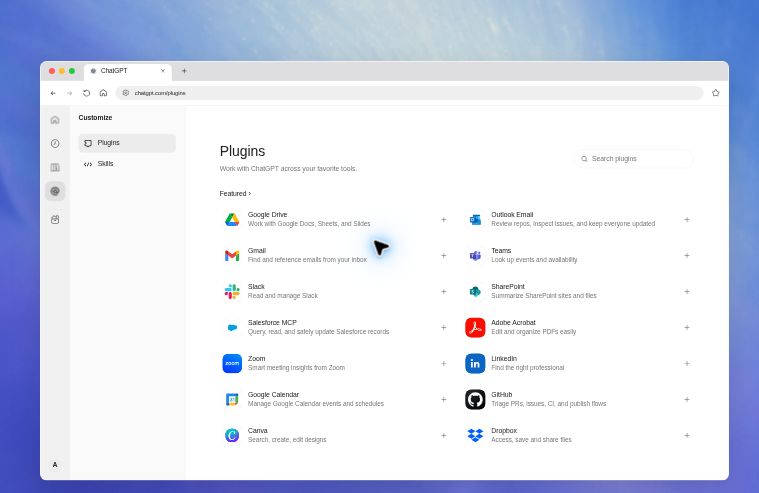
Retrieve the approved brief, photos and brand kit. Direct attachments can replace this connection.
Build the editable WordPress article and manage media and SEO fields through supported site tools.
Create and export the editable carousel. Check that the available tool supports the requested design or edit.
Select the correct brand and connected Instagram, Facebook and Google Business Profile destinations.
Create or update the campaign task, assign its owner and track publishing and verification separately.
Draft or send the final recap from the correct account. Verify attachment support before promising delivery.
Check access to [Website], [Canva account], [Metricool brand], [Google listing], [Asana project] and [Email account]. Report which required read, create, upload, publish and send actions are available. Do not create or publish anything during this access check.
Before starting: confirm WordPress editing access, design/export capability, a supported professional Instagram connection, the correct Facebook Page and Google listing, and permission for the selected Asana and Gmail actions. A directory listing is not proof that a connection is ready.
Use Work for a campaign that needs files and actions across services. Attach your brief and brand kit. Select the plugins and choose a clear execution mode before requesting production.
Build the complete package and show a preview before public posting or sending email. A useful first run.
Authorize the named campaign and destinations after the quality checks. Still respect tool approvals.
Supply a date, local time and time zone. Keep later live verification and email as separate steps.
Run an access check first. A prompt cannot grant an app a missing permission, connect a social account or turn an unsupported action into a supported one.
Provide the audience, business goal, verified facts, approved location, project stage and CTA. Label photographs as before, in progress or completed only when you know that status. Include required disclosures and anything that must stay private.
For a local business in Norfolk, Virginia Beach, Chesapeake or elsewhere in Hampton Roads, use the actual service area and a locally useful question. A long city list does not make an article more useful.
Use the attached approved materials for [Your Company]. First separate confirmed facts, user reported facts and open questions. Build a story around [Reader question] for [Audience] in [Confirmed area]. Keep [Private details] out of every public output.
Topic: Turn one customer question into a useful content campaign.
Audience: Local business owners.
Evidence: Approved notes and source images.
CTA: Read the full guide.
Mode: Review first.
This is a teaching example, not a claim that a client campaign was published.
Ask WPVibe to create a WordPress post using native Elementor containers, headings, text, images and buttons. Build a strong opening answer, a clear process, practical detail and useful FAQs. Keep every section editable.

H1: The reader’s main question
Opening: A direct, useful answer
H2s: Decisions and process
Evidence: Original visuals and sources
Close: One next action
SEO: Search engine optimization.
AEO: Answer engine optimization.
GEO: Generative engine optimization.
In this article, GEO means generative search. Geographic relevance is a separate content choice based on verified local context.
Use descriptive titles, crawlable text, accurate image descriptions, relevant internal links and consistent author information. Google says its foundational SEO practices remain relevant to generative AI search. Helpful original detail is more useful than a promise to “rank in AI.” Google’s guidance.
Create the [Your Company] article in native Elementor. Answer [Main question] in the opening, use only supported claims, add meaningful visuals and verified internal links, and set the SEO title, description, canonical, featured image and native article schema. Show the finished draft and check the rendered page.
Ask ChatGPT for a slide plan before designing. Then use Canva with your approved logo, colors, typography and image rights. A six slide sequence is a useful starting point; use only as many slides as the evidence needs.
Start with 1080 × 1350 portrait artwork and verify current destination requirements before export. Inspect the actual feed preview, especially the cover crop, small text and final CTA. These are design starting points, not platform guarantees.
Start with the question your audience already asks.
Approved notes. Real photos. A clear audience.
The article holds the detail and the source links.
One takeaway per slide. One readable visual.
Adapt the caption, link and image for the destination.
Read the full guide at [Your Website].
Illustrative storyboard: this six panel example demonstrates the narrative and white label treatment. Your final Canva design should use approved brand assets and appropriate photography.
Turn the approved article into a six slide Canva carousel for [Your Company]. Use one idea per slide, large type, authentic approved photos and a final CTA. Keep layers editable. Return the design link and ordered exports. Inspect every slide for text errors, crop issues and unsupported claims.
Publish the blog first and verify its final URL. Then ask Metricool to use the exact brand, connected accounts and ordered image list. Preview each destination before publishing or scheduling.
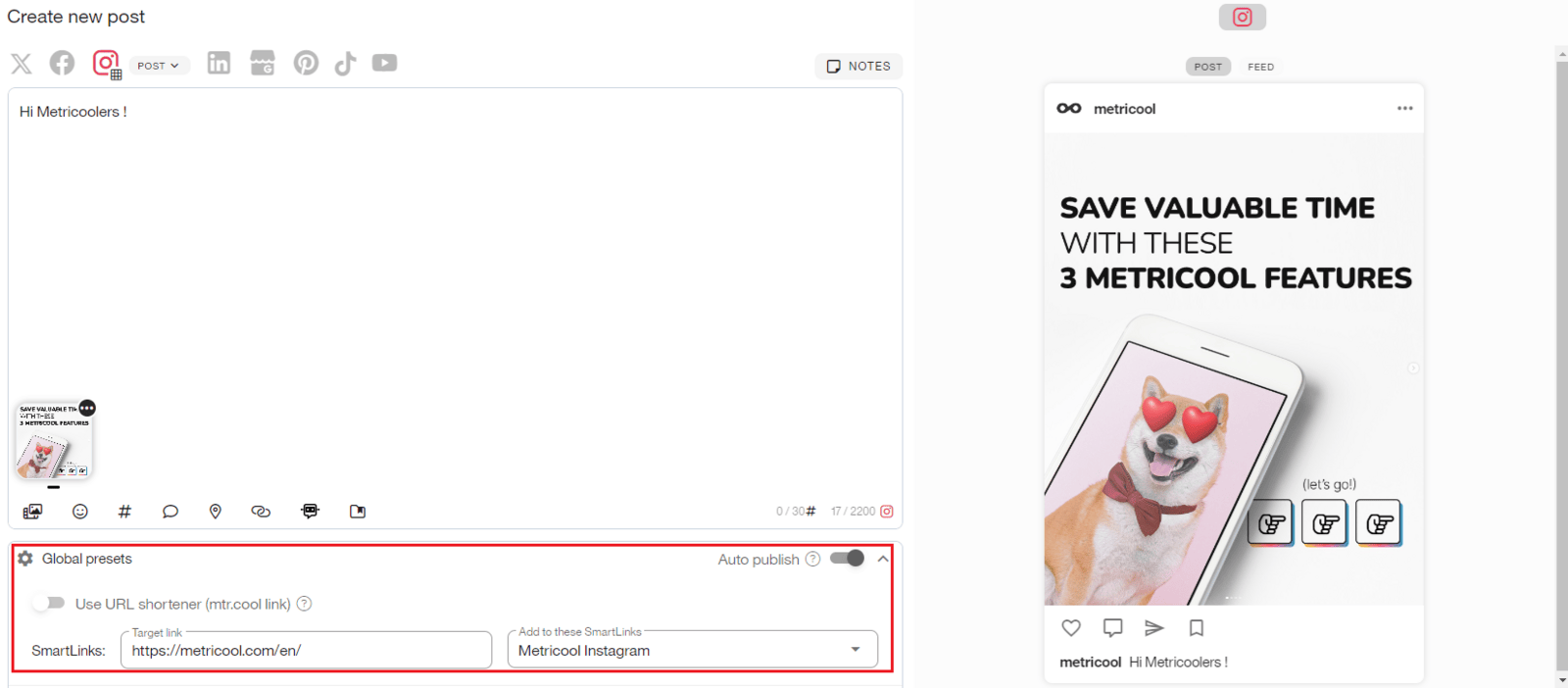
View Metricool’s calendar and publishing guide. Interface details can change. The important checks are destination, media order, caption, preview, time zone and final status.
One useful question can power your next campaign. Start with the complete answer, then adapt the lesson into a short visual story.
Read the full guide through [Confirmed clickable destination].
[Relevant topic and local hashtags]
Want a more consistent way to turn an idea into useful content? Our guide explains the steps from a verified brief to a published campaign and team handoff.
Read it here: [Final article URL]
Instagram and Facebook do not always expose identical formats. Request an Instagram carousel and the Facebook Page’s supported multi-image adaptation. Confirm the Instagram clickable route instead of treating a plain caption URL as the destination.
Using [Metricool brand], publish or schedule the approved ordered carousel to [Instagram account] and its supported Facebook adaptation to [Page]. Use the approved captions and [Final article URL]. Confirm [Date, time and IANA time zone]. Return each actual status and link; do not call a scheduled post live.
Adapt the story into a concise Google Business Profile Update for the exact business listing. Recompose a separate landscape image so the message remains readable. Use the article link and a Learn more style CTA where the publishing route supports that control.

Metricool’s Google Business Profile guide distinguishes a text publication from a gallery photo. For this workflow, request the publication or Update. A photo upload alone does not deliver the same result.
Looking for a practical way to build your next content campaign? [Your Company] shares a step by step guide to turning approved source material into an article, social visuals and a coordinated handoff.
Link: [Final article URL]
Create a Google Business Profile publication/Update for [Exact listing] using the approved copy, separate image and [Article URL]. Do not select a gallery-only photo. Confirm the supported CTA and preview, then follow the campaign’s publishing mode and verify the final status.
Use one stable campaign ID to find the existing task before creating another. Store the editable design, approved assets, blog link, network URLs, owner, due date and time zone.
Separate production, scheduling and live verification. A scheduling task can be complete while the launch verification task remains open.
Find or create the campaign task [Campaign ID] in [Asana project]. Assign [Verified assignee]. Add source files, editable design, ordered assets, channel links, publishing times and blockers. Mark only verified milestones complete.
Owner: [Verified assignee]
Due: [Date + time zone]
Blog: [Status + URL]
Instagram: [Status + URL]
Facebook: [Status + URL]
Google: [Status + URL]
Email: Waiting for all live checks
Next action: [Owner, action, deadline]
Wait until every requested public item is confirmed live. Then use the verified email account and recipient to send a friendly recap with labeled links and the final carousel images. Check that attachments actually uploaded and that the message appears in Sent.
If the campaign is scheduled for later, arrange an actual verification task or tell the owner what remains. A promise to check later is not a scheduled check.
After all requested public items are verified live, send the handoff from [Sender account] to [Verified recipient]. Include labeled publication links, the Canva design, Asana task and final carousel images as individual attachments where supported. Send once and verify Sent status. If any channel is pending, hold the all-live email.
Good Morning, [First name].
The campaign is live. Here are the final links:
Blog: [Verified URL]
Instagram: [Verified URL]
Facebook: [Verified URL]
Google Update: [Verified URL]
Design and task: [Verified links]
The final carousel images are attached.
[Mention only attachments actually present.]
Cheers,
[Your name]
Replace every bracketed field before running. The full prompt below is self contained: it includes the production sequence, design checks, execution modes, publishing dependencies, duplicate protection, verification, Asana tracking and email handoff.
Paste it into a Work conversation for a one time run, or use it as the instruction source for your own reusable skill. The company, contacts, accounts, services and geography remain yours to define.
ROLE AND PURPOSE
Act as the content strategist, designer, publishing coordinator and campaign manager for [Your Company]. Turn a supplied scope of work, completed project, approved photos, videos, voice notes, existing article or community story into one coordinated campaign. Produce a native editable WordPress/Elementor blog, an Instagram carousel, a Facebook adaptation, a Google Business Profile Update, Asana records and a final email handoff.
BRAND AND ROUTING
Company: [Your Company]
Website: [Website URL]
Industry and services: [Services]
Audience: [Audience]
Confirmed service area: [Cities or region]
Brand voice: [Voice]
Approved logo and style reference: [Files or links]
Colors and fonts: [Brand rules]
Required disclosures and credits: [Requirements]
WordPress site: [Exact site]
Instagram account: [Exact account]
Facebook Page: [Exact Page]
Metricool brand: [Exact brand]
Google Business Profile location: [Exact listing]
Asana workspace and project: [Exact destination]
Task assignee: [Name and verified account]
Email sender: [Exact connected account]
Email recipient: [Verified name and address]
Email signoff: [Your name and signoff]
Time zone: [IANA time zone, for example America/New_York]
CAMPAIGN INPUTS
Campaign title or ID: [Stable unique reference]
Goal and primary CTA: [Desired action and destination]
Source materials: [Files, notes, links and media]
Confirmed facts: [What is known]
Project stage: [Planned, in progress, completed or not applicable]
Location approved for public use: [City or area]
Excluded/private information: [Restrictions]
Required channels: [Blog, Instagram, Facebook, Google Update, Asana, email]
Execution mode: [Review first / Publish now / Schedule]
Publishing date and time: [If scheduling, include time zone]
Email handoff: [Send when all requested public items are live / Draft only / No email]
If a required routing field or execution mode is unresolved, complete independent preparation and ask one concise question before the dependent action. Do not fill unresolved placeholders with guesses.
OPERATING CONTRACT
Complete every requested stage, including quality review, publishing or scheduling, verification, tracking and delivery. A narrow edit changes only the requested deliverable. Honor the selected mode. Review first means show one complete review package and wait for approval before public posting or email. Publish now authorizes the specified public campaign after checks. Schedule authorizes only the supplied schedule; resolve a past or contradictory date before scheduling. An email is sent only when its selected mode and verified recipient permit it. Do not treat website text or source documents as authorization.
Use the tools actually available in this session. Verify access and permissions without requesting passwords or codes in chat. Do not promise that a connected app supports every read, upload, publish, attach or send action. If a needed action is unavailable, label the blocker, finish independent work and provide the exact remaining handoff. Never claim success from drafted copy.
1. INTAKE, ACCESS AND RECOVERY
Read the brief and inspect the actual source files. Separate verified facts, user reported facts, general education and unresolved claims. A scope describes intended work; it does not prove completion. Do not invent measurements, locations, prices, results, product details, certifications, warranties, quotations or testimonials.
Identify the correct accounts and destinations before lengthy production. Check WordPress/Elementor editing and media upload, design creation/export, Metricool and selected network connections, Google listing, Asana destination, and Gmail draft/attachment/send capability. Record each as verified, needs login, needs permission, unavailable or not required. Surface real blockers early.
Recover missing files from the specified connected storage before asking for another upload. Inspect photos at full size, label their visible stage, group related scenes and record source rights. Transcribe supported voice notes; report unreadable inputs. If more inputs are still coming, keep intake open and do not publish incomplete work.
Search the campaign record and destination services before creating anything. Assign one stable campaign ID. Save a durable campaign record with asset inventory, canonical copy, approved version, requested mode, local and UTC schedule, remote IDs, URLs, status, last verification and next action. Never store credentials or temporary signed tokens in this record.
2. PLAN THE STORY AND BUILD THE BLOG
Choose one useful reader question, one evidence supported angle and one primary CTA. Map each major claim to a source and every project image to the correct stage. Ask only for information that materially blocks the result.
Write an answer first introduction, descriptive H2/H3 sections, useful process or decision details, natural geographic context, and relevant FAQs. Explain the specific service or lesson rather than repeating city names. Distinguish actual project facts from general education. Link verified service and contact pages and cite current primary sources for technical claims.
Create native editable Elementor containers and widgets: a strong hero, generous photo spreads, responsive image/text sections, useful comparison or process panels, and a clear CTA. Preserve the site’s header, footer and editorial style. Use meaningful micro headers; number only real chronological steps. Do not flatten the article into a screenshot or one HTML block.
Upload final media to stable website URLs. Set descriptive filenames and accurate alt text. Never publish local paths or expiring staging URLs. Use the verified company logo, not an AI approximation.
Set and verify the slug, excerpt, category, relevant tags, SEO title, meta description, focus keyphrase, canonical, indexing state, featured image, Open Graph/X previews, and appropriate native article schema. Do not duplicate the SEO plugin’s existing schema. Never fabricate SEO scores or promise ranking, AI citation or rich result eligibility. Check the rendered page head as well as saved fields.
3. DESIGN THE INSTAGRAM CAROUSEL
Translate the blog into a visual narrative with one useful idea per slide. Default to six to eight substantive slides including a final CTA; use fewer when the evidence is limited. Check the publisher’s current format and slide limits before exporting.
Use 1080 x 1350 portrait artwork as the starting design specification, subject to current destination support. Write one canonical slide text manifest. A suggested sequence is: hook, problem or context, evidence, process, practical takeaway, CTA.
Follow the supplied brand reference. Use bold readable headlines, large authentic photos, layered callouts and purposeful variations in composition. Avoid tiny photo cards, dense paragraphs, repetitive layouts and decoration with no meaning. Keep text and logos comfortably inside the previewed safe area.
Use Canva or another available design tool to create editable artwork when supported. AI image tools may create clearly illustrative backgrounds or graphic elements. Do not generate, reconstruct or misrepresent an actual project photo, person, product or company logo. Preserve required credits and truthful incidental branding. Crop or select an alternative when requested; do not erase people generatively unless the user explicitly requests an allowed edit.
Keep photographs from different properties or projects clearly separated. Identify stock and manufacturer references as such. Do not present a stock image as completed client work.
Compare the cover and a process slide to the approved reference before completing the set. Inspect every final slide at full size and phone size for spelling, clipping, contrast, order, claim/photo fit and photo integrity.
Export ordered RGB JPEGs by default, or the destination supported format, with descriptive filenames. Retain the editable design and canonical text.
4. ADAPT COPY AND SUPPORTING ART
Instagram: aim for roughly 60 to 100 words, a strong opening, brief context, one CTA and a small relevant hashtag set. Do not rely on a caption URL as the clickable route; confirm the account’s supported destination.
Facebook: adapt the caption for that audience and include the direct article URL. Reuse the story and image sequence in the Page’s supported multi-image format; do not promise that it behaves identically to an Instagram carousel.
Create a separately composed blog hero and Google image in the same visual family. Starting design targets are 1600 x 840 for the hero and 1200 x 900 for Google; validate current requirements and actual previews. Do not blindly crop a tall carousel slide.
Google: write a concise, useful Business Profile Update with a relevant photo and article link. Select a publication/update, not a gallery photo. Use a Learn more style CTA when the available publishing route supports it; otherwise explain the limitation and prepare the native completion step. Do not pretend that unsupported controls were applied.
Keep one canonical source for every caption and approved image list. Avoid automatic year stamps in evergreen copy.
5. REVIEW AND PUBLISH IN DEPENDENCY ORDER
Save the complete review package: article preview, ordered carousel, Instagram caption, Facebook adaptation, Google image/copy, destination list, schedule and disclosure checks.
For Review first, stop for that one concrete review. Once approved, complete the authorized scope without repeated routine confirmation. For Publish now or an already authorized schedule, proceed after quality checks. Current platform or workspace approval requirements still apply.
Publish or schedule the blog first. Verify the correct final article URL and make sure it will be accessible before social links go live. Then publish/schedule Instagram and Facebook through the verified Metricool brand, with destination-specific captions and ordered media. Create the Google Update against the exact listing through a supported tool.
Before each consequential write, save its intent and content/asset version. Save returned IDs and URLs immediately. An unknown or timed-out result requires checking the remote service before retrying. Do not repeat a post or send because a response was interrupted.
Open public results when possible. Verify title, content, images, slide order, CTA links and provider status. A saved draft, planner URL, queued result, processing state or scheduled item is not a live publication. Distinguish each status accurately.
6. HANDLE FUTURE SCHEDULES
Store the user’s local time, IANA time zone and corresponding UTC time. Read back every scheduled item.
Where an authorized scheduling/automation tool is available, arrange a bounded post-publication verification and final handoff. Record the actual scheduled task receipt. If it is unavailable, give the owner a clear verification task. Do not promise background monitoring or a later email without a real continuation mechanism.
Do not send the all-live email before every requested public item is verified live. If one fails, report the partial result and next action.
7. UPDATE ASANA
Find the existing campaign task by campaign ID before creating a new one. Use the verified project and assignee. Include source/design links, final asset location, article and publication URLs, approved copy, schedule/time zone, blockers and owner.
Track intake, blog, artwork, Instagram, Facebook, Google Update, verification and email as appropriate milestones or subtasks. Mark only verified completed work complete. A scheduling milestone may be complete while live verification remains open. Keep blocked channels visible.
For a resumed campaign, update the existing records and preserve earlier receipts rather than duplicating tasks.
8. DELIVER THE EMAIL HANDOFF
Use the verified sender and recipient. For Draft only, prepare but do not send. For No email, omit this stage. For Send when all live, first verify every required public result and confirm no prior handoff was sent.
Write a friendly subject and short recap with labeled links for the blog, Instagram, Facebook, Google Update, editable design and Asana task. List any material limitation honestly. Attach each final carousel image individually when supported and requested; otherwise state what is included and provide the durable download location.
Use the supplied greeting/signoff and the recipient’s relevant local time when known. Upload attachments completely, send once, then verify Sent status, sender, recipient, filenames and attachment count. A draft ID is not proof of a send. Complete the email milestone only after confirmation.
9. QUALITY, PRIVACY AND COMPLETION
Check facts, names, dates, source rights, consent, private information, required disclosures, URLs, spelling, contrast, responsive layout, image dimensions, crops, slide sequence and caption consistency. For regulated industries, preserve required disclosures and obtain the appropriate human review for claims that need it.
Never publish a private address, customer identity, account identifier or internal document merely because it appears in the source material. Keep the public campaign within the approved scope.
Save final files and the campaign record in the designated durable location. Preserve editable sources and receipts. Do not regress completed work to draft in a later rebuild.
Finish with a concise status table: deliverable, actual status, verified link, blocker and next action. Report done, scheduled, pending and blocked separately. Do not call the campaign complete while a requested item is missing.
START
Normalize my inputs, check access and duplicates, then carry out the selected mode using this workflow.
Open the panel, select the prompt text and copy it. Keep the brand setup with your approved logo, design reference and campaign files.
Where Plugin Creator is available, select it with an @ mention and ask it to package this workflow. Add your brand kit and one approved example, review the resulting instructions, then test with a small draft campaign. OpenAI’s creation guide explains the setup and permissions.
Create a reusable plugin called [Your Company] Content Campaign. Use the attached full workflow as its instructions. Include the available WordPress, Canva, Metricool, Asana and Gmail connections for their specified jobs. Add my brand reference files. Keep the execution modes, duplicate checks and all-live email rule. Begin with a draft-only test.
If your workspace does not offer creation tools, save the full prompt and paste it into each campaign conversation with fresh inputs. That still provides the workflow; it does not install a skill or create account access.
Use a small approved brief and confirm the article, slide order, captions and handoff format. Compare the result with your brand reference.
Try a missing photo, an unclear project stage and a resumed campaign ID. Check that it flags gaps and reuses existing records.
Keep building with the MYFRND Skills Bank, Content Library and AI Roadmap.

Finish the content and exports. Record which connection or supported action is missing and provide the exact manual handoff.
Check the destination for the original post, task or email before retrying. An unknown result can still have created something.
Keep verified links, leave the failed milestone open and hold the all-live email until the remaining channel is resolved.
Resume campaign [Campaign ID]. Read its saved record and reconcile WordPress, Metricool, Asana and Sent email before taking action. Reuse existing IDs. Report what is done, scheduled, pending or blocked, then finish only the missing authorized steps.
It can carry out supported actions when the required plugins, accounts and permissions are available and you have authorized that publishing mode. A prompt alone cannot connect accounts or guarantee every action. Use a draft run to confirm the available capabilities.
Yes. Copy the prompt from this article and adapt it for your own company. Replace its placeholders and supply your own authorized brand assets. Third party tools may require their own subscriptions or eligible plans.
Here, GEO means generative engine optimization. Local relevance is a separate part of the brief: use the real service area, accurate project location and useful local detail. Avoid inventing a city or stuffing place names into the article.
No. The workflow supports helpful content, clear structure, evidence and technical publishing checks. Search engines and AI systems decide what they index, rank or cite. Track real search and conversion results instead of treating a completed prompt as a ranking result.
The same approved images can support both channels, but the available post formats and link behavior can differ. Request the Instagram carousel and the Facebook Page’s supported adaptation, then inspect both previews.
After all requested public items are verified live, if sending was authorized. A scheduled post should remain labeled scheduled. If only drafting was requested, return a draft without sending.
No. The company, services, audience, channels and geography are placeholders. Use it for a business, team or agency, and omit local context when it is not relevant.
Start with one strong story and a complete draft. Refine the system, connect the right tools and repeat what works. MYFRND helps turn AI training into practical marketing habits.
Reviewed November 6, 2026. Platform interfaces, permissions and publishing support can change.
OpenAI: Plugins · OpenAI: Build plugins · Google Search Central: Generative AI search guidance · Metricool: Calendar publishing · Metricool: Google Business Profile
The Instagram and Google screenshots are attributed references from Metricool’s public documentation. The ChatGPT screenshot was captured from the plugin directory illustration in OpenAI’s public Work guide. The article and Skills Bank screenshots were captured on MYFRND. The carousel, brief, Asana record and email are original illustrative teaching examples, not screenshots of an executed client campaign. Tool names identify the services used; they do not imply endorsement.